NodePort Services
A NodePort service allows you to expose a service (externally) by opening a specific port on every node in the cluster.
Any requests made through the node will be routed to the service, even if the node doesn't handle the service.
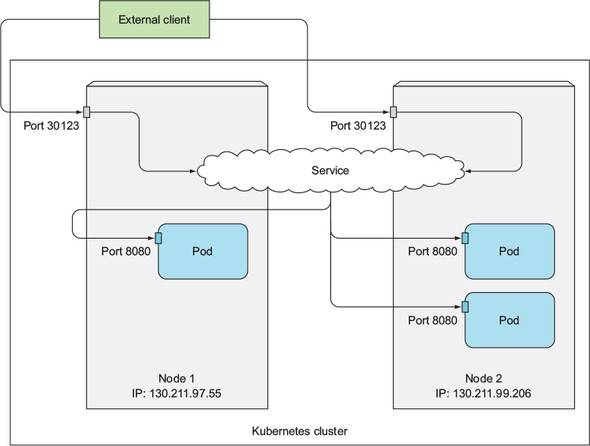
nodePort (30123) will be routed to the targetPort (8080) of the pods that handle the service. (Source: Lukša)NodePort service descriptor
Mention the service's selector, and the ports mapping.
apiVersion: v1
kind: Service
metadata:
  name: kubia-nodeport
spec:
  type: NodePort
  # pods that handle the service have these labels
  selector:
    app: kubia
  ports:
    - # connect here if you use the service's internal IP
      port: 80
      # connect here if you use a cluster node's IP
      nodePort: 30123
      # traffics will be routed here
      targetPort: 8080
Connecting to a NodePort service
Ensure that you have allowed external connections to your nodes on the specified port.
When you list your NodePort service,
kubectl get svc kubia-nodeport
# NAME             CLUSTER-IP       EXTERNAL-IP   PORT(S)        AGE
# kubia-nodeport   10.111.254.223   <nodes>       80:30123/TCP   2m
Observe that:
- The
EXTERNAL-IPcolumn — lists<nodes>, which means you can connect to the service using any of the cluster node's IP - The
PORT(S)column — lists the "internal port" and the "node port":- internal port 80, if you want to connect from the service's cluster-internal IP (in this case, 10.111.254.223)
- node port 30123, if you want to connect from the cluster node's IP
In other words, this means that you can connect to your service through:
10.111.254.223port 80<1st node's IP>port 30123<2nd node's IP>port 30123- and so on
References
- Kubernetes in Action (Marko Lukša) — Chapter 5. Services: enabling clients to discover and talk to pods
- What are Kubernetes Services? — https://www.vmware.com/topics/glossary/content/kubernetes-services.html