Ingress
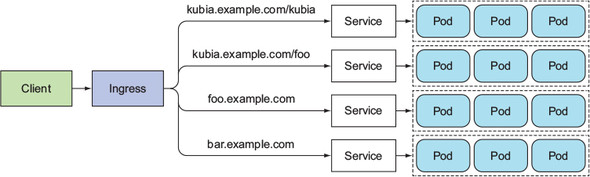
An Ingress allows you to expose multiple services under a single public IP (and load balancer).
An Ingress works on the application layer, so you can do path-based routing, cookie-based session affinity, etc., which Services can't.
Ingress controller
To make ingress resources work, an Ingress controller needs to be running in the cluster.
Different Kubernetes environments use different implementation of the Ingress controller, and some may not provide a default controller at all.
Enablic Ingress controller in Minikube
Check if the Ingress add-on is enabled:
minikube addons list
# - default-storageclass: enabled
# - kube-dns: enabled
# - heapster: disabled
# - ingress: disabled # <--
# - registry-creds: disabled
# - addon-manager: enabled
# - dashboard: enabled
If it's not enabled, enable the Ingress add-on:
minikube addons enable ingress
# ingress was successfully enabled
Enabling the Ingress add-on will start the Ingress controller pod, most likely running in the kube-system namespace. In the following example, you see that Nginx is used to provide the Ingress functionality.
kubectl get po --all-namespaces
# NAMESPACE    NAME                            READY  STATUS    RESTARTS AGE
# default      kubia-rsv5m                     1/1    Running   0        13h
# default      kubia-fe4ad                     1/1    Running   0        13h
# default      kubia-ke823                     1/1    Running   0        13h
# kube-system  default-http-backend-5wb0h      1/1    Running   0        18m
# kube-system  kube-addon-manager-minikube     1/1    Running   3        6d
# kube-system  kube-dns-v20-101vq              3/3    Running   9        6d
# kube-system  kubernetes-dashboard-jxd9l      1/1    Running   3        6d
# kube-system  nginx-ingress-controller-gdts0  1/1    Running   0        18m
Ingress descriptor
With the Ingress controller running, you can now crate an Ingress resource.
Specify the routing rules (the host and list of paths):
apiVersion: networking.k8s.io/v1
kind: Ingress
metadata:
  name: ingress-wildcard-host
spec:
  rules:
    # You can also use wildcards for the host
    # e.g. "host: '*.foo.com'"
    - host: 'foo.bar.com'
      http:
        paths:
          # This match all incoming requests
          # (because it matches by the '/' prefix)
          - pathType: Prefix
            path: '/'
            backend:
              service:
                name: service1
                port:
                  number: 80
Path spec
A pathType can be:
ImplementationSpecific— matching is up to the IngressClassExact— case sensitive match exactly (also needs to match the trailing slash)Prefix— case sensitive match by path segment prefix (split by/), also ignores trailing slashes
# Under .spec.rules[i].http
paths:
  - pathType: Prefix
    path: '/foo'
    backend:
      service:
        name: service2
        port:
          number: 80
  - path: /icons
    pathType: ImplementationSpecific
    backend:
      resource:
        apiGroup: k8s.example.com
        kind: StorageBucket
        name: icon-assets
Accessing the service through the Ingress
Get the address of the ingress
kubectl get ingresses
# NAME      HOSTS               ADDRESS          PORTS     AGE
# kubia     kubia.example.com   192.168.99.100   80        29m
Configure your DNS to resolve the ingress host to the ingress' IP (edit /etc/hosts if you're developing locally):
192.168.99.100 kubia.example.com
Access the ingress:
curl http://kubia.example.com
# You've hit kubia-ke823
How it works
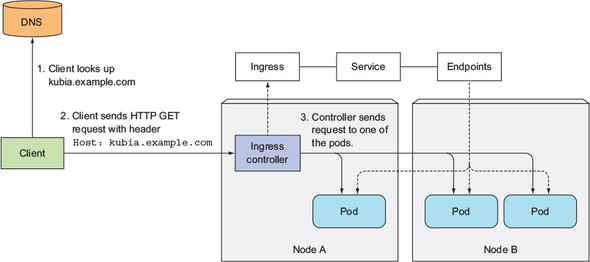
The IP you obtained earlier (the one you set in the DNS) is the IP of the Ingress controller.
Using the incoming request's Host header and path, the Ingress controller determine (1) which service to hit, and (2) which pod IPs can the request be forwarded to (by looking at the service's Endpoints).
The Ingress controller then forward the request to the service's pod. (It doesn't forward the request to the Service itself. It only uses the Service info to select a pod.)
Configuring Ingress to handle HTTPS traffic
Only the connection between the client and the Ingress controller needs to be encrypted (using TLS/HTTPS). Connection between the Ingress controller and your pod doesn't have to.
Here's how you can set that up. Generally, you need to attach a certificate and a private key to the Ingress.
Creating a private key and a TLS certificate
# Create a private key
# output as tls.key
openssl genrsa -out tls.key 2048

# Create a TLS certificate
# output as tls.cert
openssl req -new -x509 -key tls.key -out tls.cert -days 360 -subj /CN=kubia.example.com
Creating a Kubernetes secret
kubectl create secret tls tls-secret --cert=tls.cert --key=tls.key
# secret "tls-secret" created
Updating your Ingress descriptor
apiVersion: extensions/v1beta1
kind: Ingress
metadata:
  name: kubia
spec:
  tls:
    - hosts:
        - kubia.example.com
      secretName: tls-secret
  rules:
    # ...
References
- Kubernetes in Action (Marko Lukša) — Chapter 5. Services: enabling clients to discover and talk to pods
- Ingress — https://kubernetes.io/docs/concepts/services-networking/ingress/
- Ingress Controllers — https://kubernetes.io/docs/concepts/services-networking/ingress-controllers/