LoadBalancer Services
If your environment does not support LoadBalancer services: no load balancer will be provisioned, but the service will still behave like a NodePort service (Lukša).
A LoadBalancer service is an extension of a NodePort service: it allows you to expose a service (externally) using your cloud provider's load balancer.
Kubernetes will automatically create the load balancer, provide firewall rules if needed, and populate the service with the external IP address assigned by the cloud provider (vmware.com).
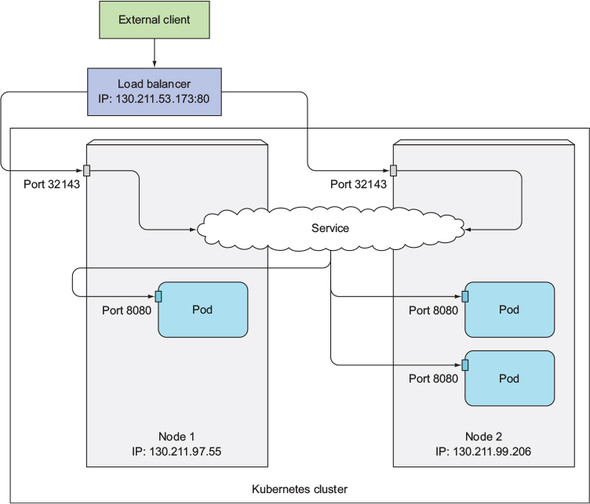
LoadBalancer service descriptor
You can't fully experiment with LoadBalancer services on Minikube. Use GKE (Google Kubernetes Engine) or something.
Mention the service's selector, and the ports mapping.
apiVersion: v1
kind: Service
metadata:
  name: kubia-loadbalancer
spec:
  type: LoadBalancer
  # pods that handle the service have these labels
  selector:
    app: kubia
  # You can mention `nodePort` here, but you don't have to
  # (you let Kubernetes choose the nodePort)
  ports:
    - # connect here if you use the service's internal IP
      port: 80
      # traffics will be routed here
      targetPort: 8080
Connecting to a LoadBalancer service
You connect to your service using the service's external IP:
kubectl get svc kubia-loadbalancer
# NAME                 CLUSTER-IP       EXTERNAL-IP      PORT(S)         AGE
# kubia-loadbalancer   10.111.241.153   130.211.53.173   80:32143/TCP    1m

curl http://130.211.53.173
# You've hit kubia-xueq1
References
- Kubernetes in Action (Marko Lukša) — Chapter 5. Services: enabling clients to discover and talk to pods
- What are Kubernetes Services? — https://www.vmware.com/topics/glossary/content/kubernetes-services.html