Path
The <path> element is the generic element to define a shape. All basic shapes (including curves and arcs) can be created using <path>.
SVG elements
<path>
d— defines the shape/coordinates of the path (see path commands below)pathLength— when drawing the stroke, assume the the total length of the path is this number instead of the actual length (e.g. for use withstroke-dasharray)
<svg xmlns="http://www.w3.org/2000/svg" viewBox="0 0 100 100" width="100" height="100">
  <path fill="hotpink" d="
    M 10,30
    A 20,20 0,0,1 50,30
    A 20,20 0,0,1 90,30
    Q 90,60 50,90
    Q 10,60 10,30
    z
  " />
</svg>
| LIVE PREVIEW
Path commands
For the d attribute, you define the drawn path using these commands.
Note that all commands are case-sensitive:
- uppercase command (e.g.
M) means absolute coordinate - lowercase command (e.g.
m) means relative coordinate (relative to the last point)
Move-to (M)
M x,y— move the current point tom dx,dy— if the current point is , move the current point to
<svg xmlns="http://www.w3.org/2000/svg" viewBox="0 0 100 100" width="100" height="100">
  <path stroke="black" stroke-width="5" d="
    M 0,10 H 100
    M 0,50 H 100
    M 0,90 H 100
  " />
</svg>
| LIVE PREVIEW
Line-to (L, H, V)
L x,y— draw a line from the current point tol dx,dy— draw a line from the current point toH x— draw a horizontal line from the current point toh dx— draw a horizontal line from the current point toV y— draw a vertical line from the current point tov dy— draw a vertical line from the current point to
Cubic Bézier curve (C, S)
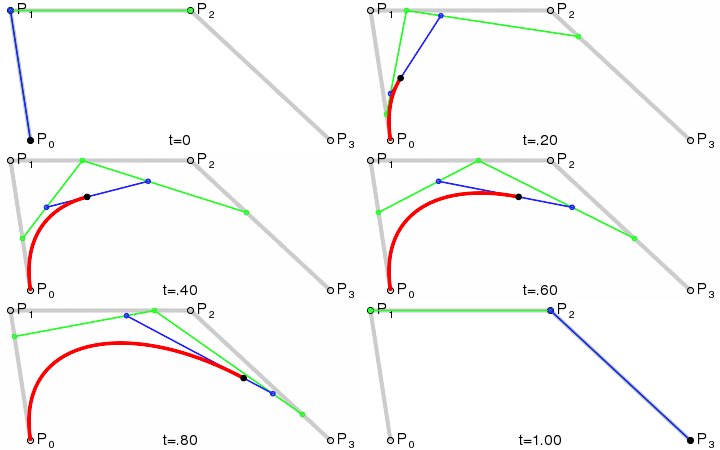
C x1,y1 x2,y2 x,y— draw a Bézier curve from the current point to , using as the start control point and as the end control pointc dx1,dy1 dx2,dy2 dx,dy— draw a Bézier curve from the current point to , using as the start control point and as the end control pointS x2,y2 x,y— draw a smooth Bézier curve from the current point to , using reflection of the end control point of the previous curve command as the start control point and as the end control points dx2,dy2 dx,dy— draw a smooth Bézier curve from the current point to , using reflection of the end control point of the previous curve command as the start control point and as the end control point
Quadratic Bézier curve (Q, T)
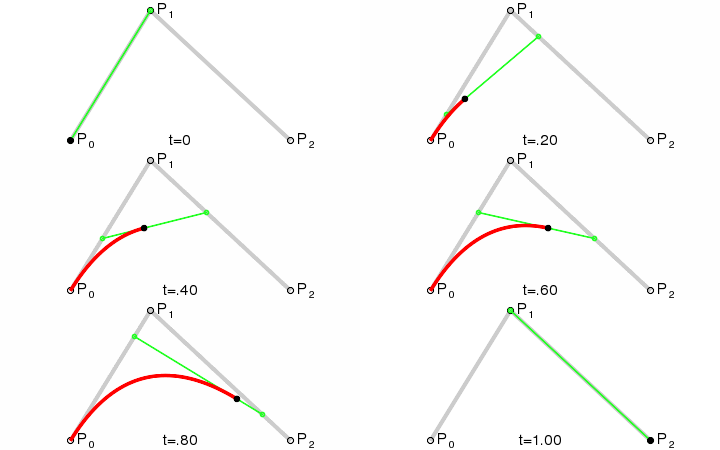
Q x1,y1 x,y— draw a Bézier curve from the current point to , using as the control pointq dx1,dy1 dx,dy— draw a Bézier curve from the current point to , using as the control pointT x,y— draw a smooth Bézier curve from the current point to , using reflection of the control point of the previous curve command as the control pointt dx,dy— draw a smooth Bézier curve from the current point to , using reflection of the control point of the previous curve command as the control point
Elliptical arc curve (A)
Note that for any given two points and , generally, there are 2 possible ellipses with radii and and rotation that can be drawn that passes through those points.*
Each ellipse has 2 possible arcs that can be drawn (the "large" and the "small" arc), giving us a total of 4 arcs to choose from.
A rx ry angle large-arc-flag sweep-flag x y— draw an arc of an ellipse from the current point to , given:rx(the radius of the ellipse in the x-axis)ry(the radius of the ellipse in the y-axis)angle(rotation of the ellipse relative to the x-axis)large-arc-flag(set1to choose the "large" arc, or0to choose the "small" arc)sweep-flag(set1to choose the "clockwise" arc when moving from the start point to the end point, or0to choose the "counter-clockwise" arc)
A rx ry angle large-arc-flag sweep-flag dx dy— draw an arc of an ellipse from the current point to , given the same parameters as above
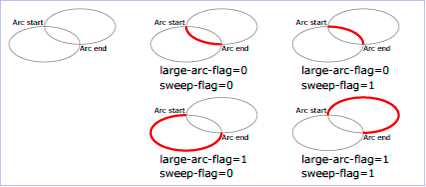
large-arc-flag and sweep-flag selects which arc to be drawn. (Source: W3)(*) If the ellipse's radii is not "big enough" to reach the two points, the ellipse's radii will be "minimally enlarged" to reach the two points (MDN).
Close path (Z)
Zorz— Close the path by connecting the last point of the path with its initial point. (If the two points are at different coordinates, a straight line is drawn between them.)
References
- <path> (MDN) — https://developer.mozilla.org/en-US/docs/Web/SVG/Element/path
- Paths (MDN) — https://developer.mozilla.org/en-US/docs/Web/SVG/Tutorial/Paths
- d (MDN) — https://developer.mozilla.org/en-US/docs/Web/SVG/Attribute/d
- Bézier curve (Wikipedia) — https://en.wikipedia.org/wiki/B%C3%A9zier_curve
- Chapter 9: Paths » The elliptical arc curve commands (W3) — https://www.w3.org/TR/SVG/paths.html