Fill and Stroke
The fill and stroke attribute lets you color shapes.
Fill SVG attributes
fill
Sets the interior color of an object. Specify:
none— transparent fill- a color — e.g.
red,#ff0000,rgba(255,0,0,1) - a URL — e.g.
url(#my-gradient),
fill-opacity
Sets the fill opacity. Specify something like 0.5 or 50%.
fill-rule
Specify how to decide the "inside part" of the shape.
nonzero— color anything "inside" the shape*evenodd— color anything "inside" the shape; but parts of the shape that are crossed even number of times by the path are considered "outside" (it's "cancelled out")**
<svg
  xmlns="http://www.w3.org/2000/svg"
  viewBox="0 0 200 120"
  width="200"
  height="120"
>
  <!-- Nonzero -->
  <path fill="orange" stroke="black" stroke-width="2"
    d="M 20,90 L 50,10 L 80,90 L 10,40 L 90,40 z" />
  <text x="50" y="120" text-anchor="middle" font-size="15">
    nonzero
  </text>
  <!-- Even-odd -->
  <path fill="red" stroke="black" stroke-width="2" fill-rule="evenodd"
    d="M 120,90 L 150,10 L 180,90 L 110,40 L 190,40 z" />
  <text x="150" y="120" text-anchor="middle" font-size="15">
    evenodd
  </text>
</svg>(*) Mathematically, you test the "insideness" of a point in the shape by drawing a ray from that point to infinity in any direction, then counting how many segments of the path crosses the ray. By nonzero rule, if there is at least one path segment crossing the ray, it's considered "inside", otherwise it's considered "outside"
(**) Similar as above. With evenodd rule, if there is an odd amount of path segments crossing the ray, it's considered "inside", otherwise it's considered "outside"
Stroke SVG attributes
stroke
Sets the outline color of the shape.
none— no stroke- a color — e.g.
red,#ff0000,rgba(255,0,0,1) - a URL — e.g.
url(#my-gradient),
stroke-width
Sets the width of the stroke. Specify a number or a percentage (relative to the size of the view).
stroke-opacity
Sets the opacity of the stroke. Specify something like 0.5 or 50%.
stroke-linecap
Sets the shape at the end of open paths ("the caps"). Specify butt, round, or square.
<svg xmlns="http://www.w3.org/2000/svg" viewBox="0 0 200 100" width="200" height="100">
  <!-- stroke-linecap effects -->
  <path stroke-width="20" d="M 20,10 H 100" stroke="black" stroke-linecap="butt" />
  <path stroke-width="20" d="M 20,50 H 100" stroke="black" stroke-linecap="round" />
  <path stroke-width="20" d="M 20,90 H 100" stroke="black" stroke-linecap="square" />
  <!-- Position of path and caption -->
  <path stroke-width="1" d="M 20,10 H 100" stroke="pink" />
  <path stroke-width="1" d="M 20,50 H 100" stroke="pink" />
  <path stroke-width="1" d="M 20,90 H 100" stroke="pink" />
  <text x="130" y="15" font-size="15">butt</text>
  <text x="130" y="55" font-size="15">round</text>
  <text x="130" y="95" font-size="15">square</text>
</svg>stroke-linejoin
Defines the shape to be used at the path corners. Specify miter, round, bevel, or arcs.
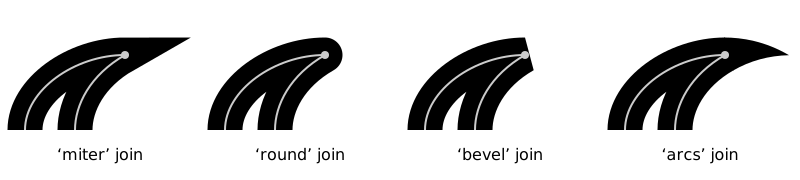
stroke-linejoin (Source: SVGWG)stroke-dasharray
Defines the pattern of dashes and gaps in the path. Specify space/comma separated array of numbers/percentages, e.g. 10 1 4 1. If you specify an odd number of values, it will be repeated to yield an even number of values: i.e. 5 3 2 is equivalent to 5 3 2 5 3 2.
You can combine this with pathLength to control the number of repetitions along the path.
<svg xmlns="http://www.w3.org/2000/svg" viewBox="0 0 270 100" width="270" height="100">
  <!-- Using real length (squished) -->
  <path stroke-width="10" d="M 20,10 H 250" stroke="black" stroke-dasharray="2 1" />
  <!-- Using pathLength to override length calculation -->
  <path stroke-width="10" d="M 20,50 H 250" stroke="black" stroke-dasharray="2 1" pathLength="6"/>
  <path stroke-width="10" d="M 20,90 H 250" stroke="black" stroke-dasharray="2 1 2" pathLength="20"/>
</svg>stroke-dashoffset
Offsets the rendering of stroke-dasharray.
Specify a number or a percentage (percentage of the current viewport).
<svg xmlns="http://www.w3.org/2000/svg" viewBox="0 0 270 100" width="270" height="100">
  <path stroke-width="10" d="M 20,10 H 250" stroke="black" stroke-dasharray="3 1" pathLength="12"/>
  <!-- offset by 1 user unit -->
  <path stroke-width="10" d="M 20,50 H 250" stroke="red" stroke-dasharray="3 1" pathLength="12" stroke-dashoffset="1"/>
  <!-- offset by 2 user units -->
  <path stroke-width="10" d="M 20,90 H 250" stroke="blue" stroke-dasharray="3 1" pathLength="12" stroke-dashoffset="2"/>
</svg>Other SVG attributes
opacity
Sets the opacity of an object. Specify a number from 0 to 1.
<svg xmlns="http://www.w3.org/2000/svg" viewBox="0 0 100 100" width="100" height="100">
  <circle cx="50" cy="50" r="50" fill="purple" opacity="0.3" />
</svg>References
- Fills and Strokes (MDN) — https://developer.mozilla.org/en-US/docs/Web/SVG/Tutorial/Fills_and_Strokes
- fill (MDN) — https://developer.mozilla.org/en-US/docs/Web/SVG/Attribute/fill
- Chapter 13: Painting: Filling, Stroking and Marker Symbols » 13.4.1. Specifying fill paint: the ‘fill’ property (SVGWG) — https://svgwg.org/svg2-draft/painting.html#FillProperty
- Chapter 13: Painting: Filling, Stroking and Marker Symbols » 13.5.5. Controlling line joins: the ‘stroke-linejoin’ and ‘stroke-miterlimit’ properties (SVGWG) — https://svgwg.org/svg2-draft/painting.html#StrokeLinejoinProperty
- fill-rule (MDN) — https://developer.mozilla.org/en-US/docs/Web/SVG/Attribute/fill-rule
- stroke (MDN) — https://developer.mozilla.org/en-US/docs/Web/SVG/Attribute/stroke
- stroke-linecap (MDN) — https://developer.mozilla.org/en-US/docs/Web/SVG/Attribute/stroke-linecap
- stroke-linejoin (MDN) — https://developer.mozilla.org/en-US/docs/Web/SVG/Attribute/stroke-linejoin
- stroke-dasharray (MDN) — https://developer.mozilla.org/en-US/docs/Web/SVG/Attribute/stroke-dasharray
- stroke-dashoffset (MDN) — https://developer.mozilla.org/en-US/docs/Web/SVG/Attribute/stroke-dashoffset