HTTP Authentication
The general HTTP authentication flow is as follows. Note the use of the following headers:
WWW-Authenticate(sent by the server)Authorization(sent by the client)
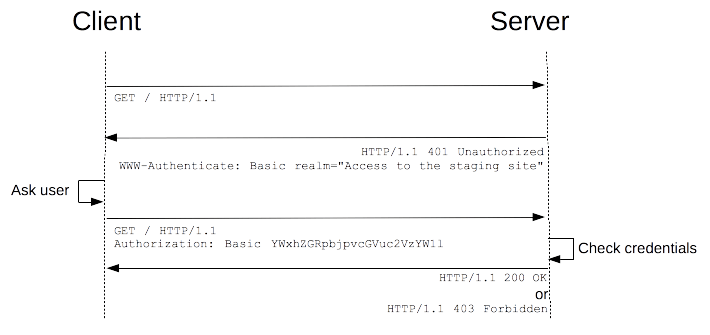
There are several authentication type maintained by IANA. The most common one is Basic (i.e. WWW-Authenticate: Basic).
Response headers
WWW-Authenticate
Defines the authentication method that should be used to gain access to a resource. It's sent with a 401 (Unauthorized) response.
<type>— the authentication type, e.g.Basicrealm=<realm>— a description of the protected area, e.g.realm="Access to the staging site"charset=<charset>— the server's preferred encoding when submitting a username and password. OnlyUTF-8is allowed.
WWW-Authenticate: <type> realm=<realm>
WWW-Authenticate: <type> realm=<realm>, charset="UTF-8"
Proxy-Authenticate
Like WWW-Authenticate, but for proxy servers. It's sent with a 407 (Proxy Authentication Required) response.
Proxy-Authenticate: <type> realm=<realm>
Request headers
Authorization
Provides credentials to authenticate a user agent.
<type>— the authentication type, e.g.Basic<credentials>— for authentication type ofBasic, it's the base64 encoding of the string<username>:<password>(thebtoafunction in JavaScript). For instance,aladdin:opensesamewill becomeYWxhZGRpbjpvcGVuc2VzYW1l.
Authorization: <type> <credentials>
References
- Authentication (MDN) — https://developer.mozilla.org/en-US/docs/Web/HTTP/Authentication
- WWW-Authenticate (MDN) — https://developer.mozilla.org/en-US/docs/Web/HTTP/Headers/WWW-Authenticate
- Proxy-Authenticate (MDN) — https://developer.mozilla.org/en-US/docs/Web/HTTP/Headers/Proxy-Authenticate
- Authorization (MDN) — https://developer.mozilla.org/en-US/docs/Web/HTTP/Headers/Authorization