Caching
Caching means storing a given response so it can be served back immediately when requested. Caching improves performance (reduces network transmission) and eases the load of the origin server.
Types of caches
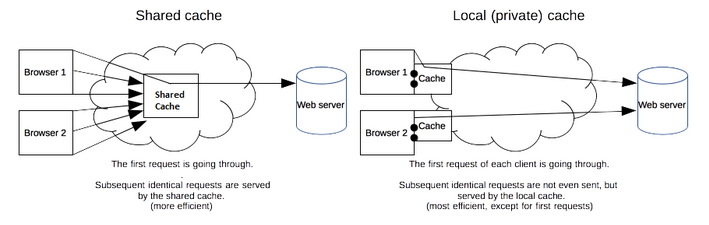
There are two types of cache:
- Shared proxy caches — cache for multiple users ("shared cache")
- Private browser caches — cache for only a single user ("private/local cache")
Reading from the response headers, they will determine what responses should be cached, and how (e.g. how long, how to revalidate for freshness).
Cache validation
Once a cached resource goes past its expiration time (determined by the max-age directive or Expire response header), when its value is about to be used again (e.g. when the user presses the reload button), it must either be:
- validated (rechecked by the origin server that the cached copy is still valid), or
- fetched again (e.g. if the resource has changed).
How it works
Validation can only occur if the server provided either a strong validator (ETag) or a weak validator (Last-Modified) in the response header.
When the client asks for a resource by including the If-None-Match (if the resource is using Etag) or the If-Modified-Since request header, the server may respond with:
- 200 (OK) — indicating the client should use this newly sent response
- 304 (Not Modified) — (with an empty body, optionally including headers that update the expiration time of the cached resource) indicating the client should use its cached copy
Response headers
Cache-Control
Controls caching behavior. Multiple directives should be separated by comma.
"Revalidation for freshness" here is done by the client sending
(via If-None-Match or If-Modified-Since request header)
no-store— don't store response in any cacheno-cache— the response can be stored in any cache, but it must always be revalidated for freshness by the origin server before its value can be used.public— the response can be stored in any cacheprivate— the response can be stored only in a browser's cache
max-age=<seconds>— how long the resource should be considered fresh (relative to the time of request)s-maxage=<seconds>— overridesmax-age, but only for shared caches (private caches will ignore it)
must-revalidate— local copy can be used if it's younger thanmax-age; otherwise it must first be revalidated for freshness by the origin server. The origin server can respond
Cache-Control: no-store
Cache-Control: no-cache
Cache-Control: public
Cache-Control: private
Cache-Control: max-age=<seconds>
Cache-Control: s-maxage=<seconds>
Cache-Control: must-revalidate
Cache-Control: proxy-revalidate
Cache-Control: no-transform
ETag
Indicates the version of a resource. You can use the content hash, last modified timestamp, or a revision number.
If this response header is present, the client will send If-None-Match on future requests of the resource to validate the cached resource.
You can use "strong" or "weak" ETag value:
- Strong Etag (e.g.
ETag: "1f2b3d") — If two strong ETags match, it means the resource is byte-for-byte identical. (It can be cached for byte range requests.) - Weak Etag (e.g.
ETag: W/"1f2b3d") — If two weak ETags match, it means the resource is semantically equivalent, but not necessarily byte-for-byte identical (e.g. different date of generation in the footer). (It cannot be cached for byte range requests.)
ETag: "<etag_value>"
ETag: W/"<etag_value>"
Last-Modified
Indicates the time at which the resource was last modified, e.g. Last-Modified: Wed, 21 Oct 2015 07:28:00 GMT (it's precise up to seconds, and always in GMT).
If this response header is present, the client will send If-Modified-Since on future requests of the resource to validate the cached resource.
Last-Modified: <day-name>, <day> <month> <year> <hour>:<minute>:<second> GMT
Age
Indicates the time in seconds the resource has been in a proxy cache.
Age: <delta-seconds>
Expires
Indicates the time after which the response is considered stale.
(If there is a Cache-Control response header with the max-age or s-maxage directive, this header is ignored.)
Expires: Wed, 21 Oct 2015 07:28:00 GMT
Vary
Indicates the response should be considered unique if any request/response header listed on Vary differs in value.
Any cache should remember the combination of header values listed on Vary, and should only give the cached resource copy if all header values match. Otherwise, a fresh response must be requested from the origin server.
Using Vary: * means each requests should be treated unique and should not be cached. (Consider using Cache-Control: no-store instead.)
Since Accept-Encoding: gzip,deflate, Accept-Encoding: gzip are considered different, to avoid unnecessary requests and duplicated cache entries, caching servers should consider normalization (i.e. preprocessing the request by normalizing/rewriting the value of the request headers).
Vary: *
Vary: <header-name>, <header-name>, ...
Request headers
Cache-Control
Requests caching behavior. Multiple directives should be separated by comma.
Cachability directivesno-store— don't store the request/response in any cacheno-cache— don't use any cached response, unless it has been revalidated for freshness by the origin serverno-transform— don't let any intermediary servers transform the response (e.g. to compress the images)only-if-cached— only send cached response, otherwise send a 504 (Gateway Timeout) response
max-age=<seconds>— asks for response whose age is not greater than the given number of secondsmax-stale=<seconds>— it's acceptable to give stale response (exceeded its freshness lifetime), as long as it hasn't been stale for more than the given number of secondsmin-fresh=<seconds>— asks for response which would still be fresh for the given number of seconds (the freshness lifetime is no less than its current age plus the specified time in seconds)
Cache-Control: no-store
Cache-Control: no-cache
Cache-Control: no-transform
Cache-Control: only-if-cached
Cache-Control: max-age=<seconds>
Cache-Control: max-stale[=<seconds>]
Cache-Control: min-fresh=<seconds>
If-None-Match
Requests the server to only send a full 200 (OK) response if it doesn't have an ETag matching the given ones. Otherwise, the server will send 304 (Not Modified) response with an empty body.
<etag-value>— may be prefixed withW/to indicate weak etag.*— a special value to represent any resource (e.g. used with PUT to check if the same resource has been uploaded before)
If-None-Match: "<etag-value>"
If-None-Match: "<etag-value>", "<etag-value>", ...
If-None-Match: *
If-Modified-Since
Requests the server to only send a full 200 (OK) response if the resource has been last modified after the given time. Otherwise, the server will send 304 (Not Modified) response with an empty body.
Used in conjuction with Last-Modified response header. Ignored if If-None-Match is also present.
If-Modified-Since: <day-name>, <day> <month> <year> <hour>:<minute>:<second> GMT
References
- HTTP Caching (MDN) — https://developer.mozilla.org/en-US/docs/Web/HTTP/Caching
- Demystifying HTTP Caching (codeburst.io) — https://codeburst.io/demystifying-http-caching-7457c1e4eded
- Cache-Control (MDN) — https://developer.mozilla.org/en-US/docs/Web/HTTP/Headers/Cache-Control
- Last-Modified (MDN) — https://developer.mozilla.org/en-US/docs/Web/HTTP/Headers/Last-Modified
- If-None-Match` (MDN) — https://developer.mozilla.org/en-US/docs/Web/HTTP/Headers/If-None-Match
- If-Modified-Since (MDN) — https://developer.mozilla.org/en-US/docs/Web/HTTP/Headers/If-Modified-Since
- Age (MDN) — https://developer.mozilla.org/en-US/docs/Web/HTTP/Headers/Age
- Expires (MDN) — https://developer.mozilla.org/en-US/docs/Web/HTTP/Headers/Expires
- Hypertext Transfer Protocol (HTTP/1.1): Caching » 5.2.1. Request Cache-Control Directives (HTTPWG) — https://httpwg.org/specs/rfc7234.html#header.cache-control